Magento default tier price display in list format please see in image now i have display tier price in table format.
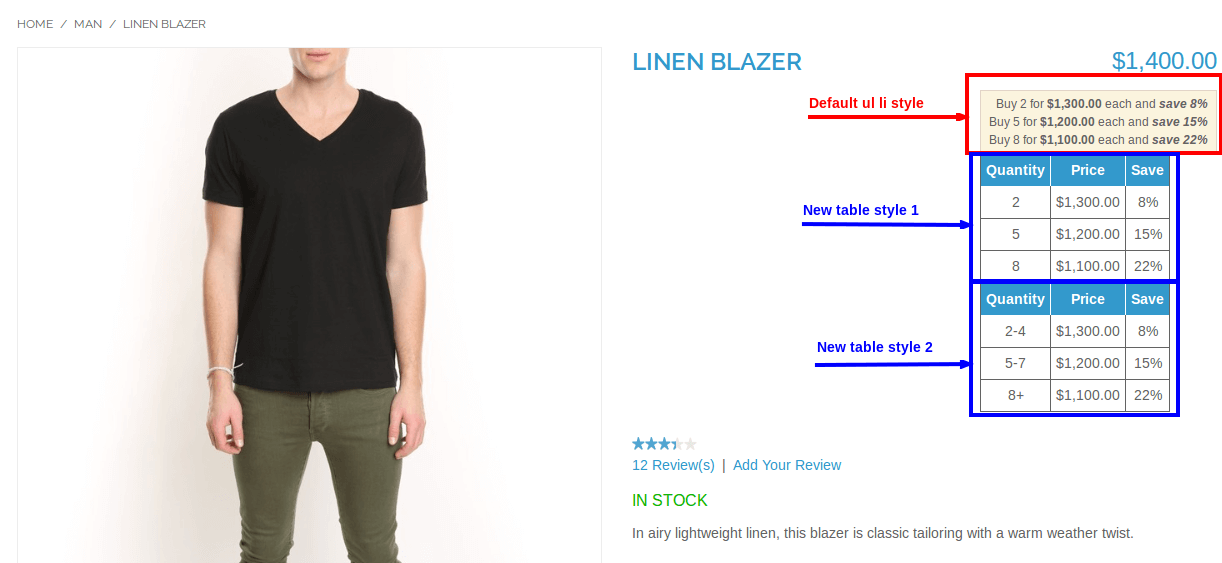
To show the tier price in table format open your product view page and add the following code:
app/design/frontend/rwd/default/template/catalog/product/view.phtml
<!-- Display product tier price -->
<?php
$_product = $this->getProduct();
$_tierPrices = $this->getTierPrices();
if (count($_tierPrices) > 0):
$_data = array();
$_prevQty = 0;
$_counter = 0;
$_tierPrices = array_reverse($_tierPrices);
foreach ($_tierPrices as $_index => $_price){
$_counter++;
$label = $_price['price_qty'];
$_data[] = array('prev'=>$_prevQty,'next'=>$_price['price_qty'],'label'=>$label,'price'=>$_price['formated_price'],'save'=>$_price['savePercent']);
$_prevQty = $_price['price_qty'];
}
$_data = array_reverse($_data); ?>
<table class="tiered-pricing" border=1>
<tbody>
<tr>
<th style="padding: 5px; text-align: center; background-color: #3399cc; color: white;font-weight: bold; ">Quantity</th>
<th style="padding: 5px; text-align: center; background-color: #3399cc; color: white;font-weight: bold; ">Price</th>
<th style="padding: 5px; text-align: center; background-color: #3399cc; color: white; font-weight: bold; ">Save</th>
</tr>
<?php foreach ($_data as $_row): ?>
<tr>
<td style="text-align: center; padding: 5px;"><?php echo $_row['label']; ?></td>
<td style="text-align: center; padding: 5px;"><?php echo $_row['price']; ?></td>
<td style="text-align: center; padding: 5px;"><?php echo $_row['save']."%"; ?></td>
</tr>
<?php endforeach; ?>
</tbody>
</table>
<?php
endif; ?>
Another Style:
<!-- Display product tier price -->
<?php
$_product = $this->getProduct();
$_tierPrices = $this->getTierPrices();
if (count($_tierPrices) > 0):
$_data = array();
$_prevQty = 0;
$_counter = 0;
$_tierPrices = array_reverse($_tierPrices);
foreach ($_tierPrices as $_index => $_price){
$_counter++;
if($_price['price_qty']>$_prevQty){
$label = $_price['price_qty']. '+';
$_data[] = array('prev'=>$_prevQty,'next'=>$_price['price_qty'],'label'=>$label,'price'=>$_price['formated_price'],'save'=>$_price['savePercent']);
$_prevQty = $_price['price_qty']-1;
} else {
$label = $_price['price_qty'] . '-' . $_prevQty;
$_data[] = array('prev'=>$_prevQty,'next'=>$_price['price_qty'],'label'=>$label,'price'=>$_price['formated_price'],'save'=>$_price['savePercent']);
$_prevQty = $_price['price_qty']-1;
}
}
$_data = array_reverse($_data);
?>
<table class="tiered-pricing" border=1 >
<tbody>
<tr>
<th style="padding: 5px; text-align: center; background-color: #3399cc; color: white;font-weight: bold; ">Quantity</th>
<th style="padding: 5px; text-align: center; background-color: #3399cc; color: white;font-weight: bold; ">Price</th>
<th style="padding: 5px; text-align: center; background-color: #3399cc; color: white;font-weight: bold; ">Save</th>
</tr>
<?php foreach ($_data as $_row): ?>
<tr>
<td style="text-align: center; padding: 5px;"><?php echo $_row['label']; ?></td>
<td style="text-align: center; padding: 5px;"><?php echo $_row['price']; ?></td>
<td style="text-align: center; padding: 5px;"><?php echo $_row['save']."%"; ?></td>
</tr>
<?php endforeach; ?>
</tbody>
</table>
<?php
endif; ?>
<!-- Display product tier price -->

5 Comments
stefan · November 13, 2016 at 7:06 pm
I suggest another way that extends default Magento Tier Price function by allowing admins to define tier prices as a percentage.
That is using a Magento extension called Percentage Tier Price, you can check it out: https://goo.gl/Ne4QY5
Richard · December 2, 2016 at 3:06 pm
Hi, this works great in Magento 1.9.3 but do you have a solution for this for Magento 2?
Many Thanks
Sushant Vishwas · December 2, 2016 at 4:05 pm
Sorry bro I don’t have
Sri · June 13, 2017 at 11:34 am
Hi, This table is working fine for simple products. For configurable products, Tier price is not changing if we change product variations.
Thanks for the article . Any suggestions please?
car dvd mart · December 22, 2017 at 1:07 pm
very good,think you.