There are two options you can use via Magento administration.
1. Setting default Sort Order for category
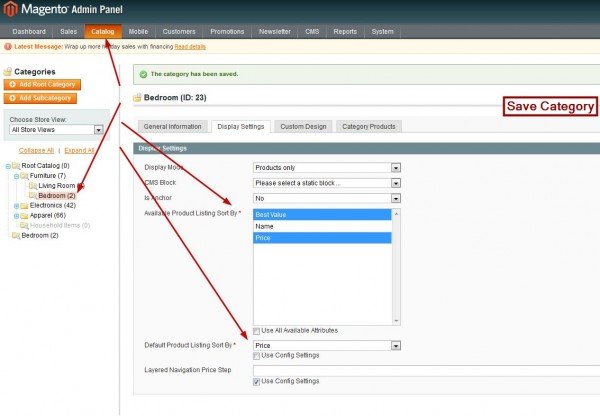
When you go to Category page in Magento administration (Catalog/Manage Categories), you’ll see “Display Settings” tab. From there you can modify “Available Product Listing Sort By” and “Default Product Listing Sort By” values.
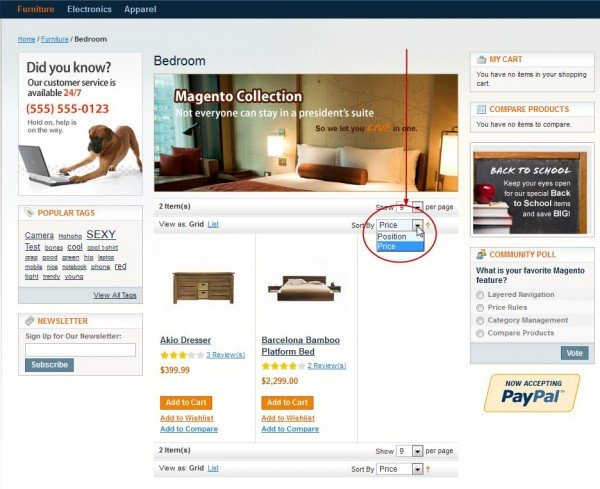
Let’s modify “Default Product Listing Sort By”. If you deselect “Use Config Settings” and if you select “Price” for “Default Product Listing Sort By”, on frontend for specified category you’ll see that all items are now sorted by price ascending (growing upward). If you have Magento CE 1.7 with Sample Data you can modify sorting by Price for, i.e. Bedroom category. Additionally you can deselect “Use All Available Attributes” for “Available Product Listing Sort By” and if you check only few of them (“Best Value” and “Price”), on frontend you’ll be able to sort only by selected options. Now click “Save Category” button.
You should see something like this:
Let’s modify “Default Product Listing Sort By”. If you deselect “Use Config Settings” and if you select “Price” for “Default Product Listing Sort By”, on frontend for specified category you’ll see that all items are now sorted by price ascending (growing upward). If you have Magento CE 1.7 with Sample Data you can modify sorting by Price for, i.e. Bedroom category. Additionally you can deselect “Use All Available Attributes” for “Available Product Listing Sort By” and if you check only few of them (“Best Value” and “Price”), on frontend you’ll be able to sort only by selected options. Now click “Save Category” button.
You should see something like this:
2. Setting default Sort Order for Store / Website / Default Config
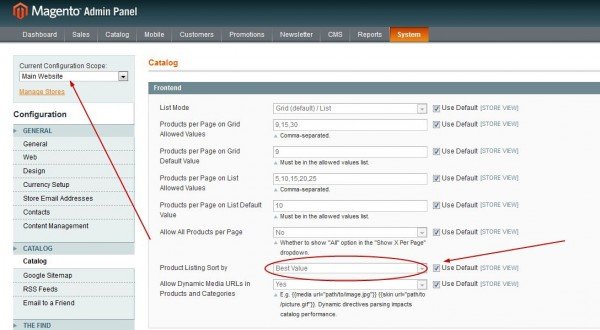
When you go to System / Configuration / Catalog (left menu) / Frontend you’ll see “Product Listing Sort by” drop down menu. Now if you deselect “Use Default” you’ll select default sorting for specified view (Store/Website/Default). This will apply to all categories but notice that by override rule (fallback) this has lower priority than “Sort Order for category”.
0 Comments